

The Power of Tool or Function Calling in LLM
Table of Contents
- 1. Introduction: Beyond Text Generation
- 2. What is Tool or Function Calling in LLMs?
- 3. How Does LLM Tool Calling Work? (The Workflow)
- 4. Why is Tool Calling Important? (The Benefits)
- 5. Real-World Examples of LLM Tool Calling in Action
- 6. Implementing Tool Calling
- 7. The Future of Tool Calling in LLMs
- 8. Conclusion: The Dawn of Actionable AI
1. Introduction: Beyond Text Generation
Large Language Models (LLMs) have rapidly evolved from impressive conversational AI systems to powerful tools capable of understanding and generating human-like text. Initially, their primary function was to engage in dialogue, answer questions based on their vast training data, and assist with creative writing tasks. However, as LLMs became more sophisticated, it became clear that their utility was limited by their reliance solely on the information they were trained on.
While LLMs possess an incredible amount of knowledge, they are inherently static. They cannot access real-time information, interact with external systems, or perform actions in the physical or digital world. This limitation prevents them from truly acting as intelligent agents that can solve complex problems requiring up-to-date information or interaction with the environment.
This is where Tool/Function Calling comes in. Tool calling is a paradigm shift that allows LLMs to connect with the outside world. By enabling LLMs to call external functions or tools, we empower them to access dynamic information, perform calculations, interact with APIs, and much more. This capability transforms LLMs from passive text generators into active participants that can gather information, make decisions based on real-time data, and even trigger actions.
In this blog post, we will delve into the fascinating world of tool/function calling in LLMs. We will explore how it works, the different approaches to implementing it, its various applications, and the potential it holds for the future of AI. Get ready to discover how we can unlock the full potential of LLMs by connecting them to the vast resources and capabilities of the external world.
2. What is Tool or Function Calling in LLMs?
At its core, Tool/Function Calling in LLMs is about extending the capabilities of these language models beyond just generating text. It's about giving them the ability to "act" in the real or digital world by allowing them to invoke external functions or tools. Instead of just providing a text response based on their internal knowledge, an LLM equipped with tool calling can recognize when a user's request requires information or action that lies outside of its training data and then formulate a request to use a specific tool to fulfill that need.
Think of an LLM as a powerful brain. It can process information, understand context, and generate coherent thoughts (text). However, without tool calling, this brain is isolated. It can think and reason, but it cannot interact with its environment. Tool calling provides the "hands and senses" for this brain. The "senses" allow it to perceive the external world by accessing real-time data through tools, and the "hands" allow it to act upon that world by triggering functions or APIs.
This approach differs significantly from traditional prompt engineering. In traditional prompt engineering, we craft carefully worded prompts to guide the LLM's text generation. While effective for many tasks, it still relies on the LLM's existing knowledge. Tool calling, on the other hand, is not just about getting the LLM to generate the right text; it's about getting it to understand when and how to use external resources to achieve a goal that is beyond its inherent capabilities.
The key to enabling tool calling lies in providing the LLM with tool definitions. These definitions act like a manual for the LLM, describing the available tools and how to use them. Each tool definition typically includes:
- Name: A unique identifier for the tool (e.g.,
get_current_weather,send_email). - Description: A clear explanation of what the tool does and when it should be used. This is crucial for the LLM to understand the tool's purpose.
- Parameters: A description of the inputs the tool requires to function correctly (e.g., for
get_current_weather, parameters might belocationandunit). These are often defined using a structured format like JSON schema. By understanding these definitions, the LLM can analyze a user's request, determine if a tool is needed, identify the appropriate tool, and format the necessary parameters to call that tool.
3. How Does LLM Tool Calling Work? (The Workflow)
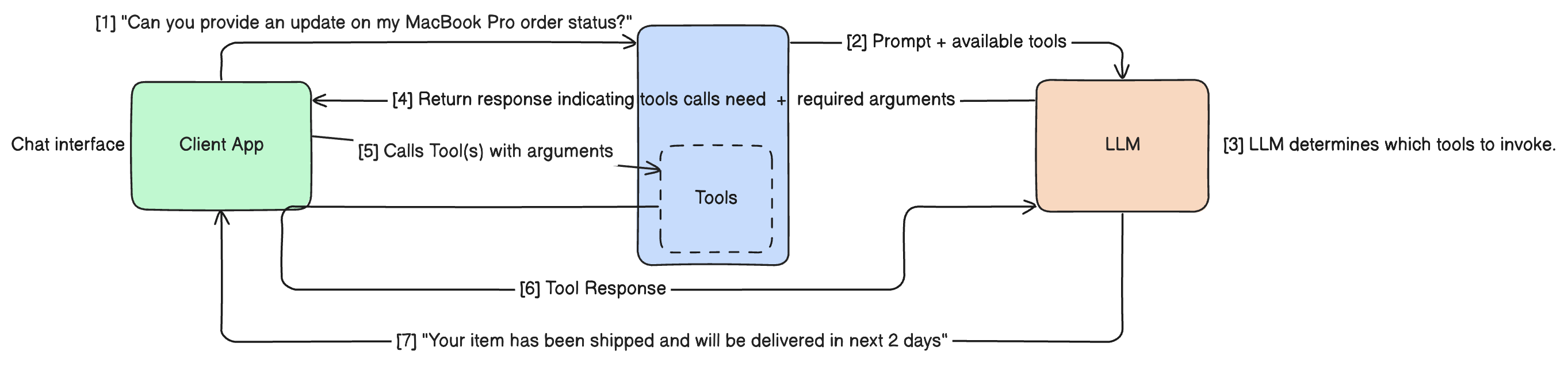
Understanding the workflow is key to grasping how tool calling empowers LLMs. It's not a single, instantaneous process, but rather a multi-step interaction between the user, the LLM, and your application or system that hosts the tools. Here's a breakdown of the typical workflow:
Step 1: User provides a query or request
The process begins with a user interacting with the LLM, providing a query or request that might require external information or action. This could be anything from "What's the weather in London?" to "Send an email to John about the meeting tomorrow."
Step 2: The LLM analyzes the request and identifies the need for a tool
The LLM, having been provided with the definitions of available tools, analyzes the user's request. It uses its understanding of language and the tool descriptions to determine if any of the available tools are relevant to fulfill the request. If the request can be answered solely from its internal knowledge, it will do so. However, if it recognizes that a tool is necessary (e.g., to get real-time data or perform an action), it proceeds to the next step.
Step 3: The LLM generates a structured "tool call"
Instead of generating a direct text response to the user, the LLM generates a structured output indicating its intention to use a tool. This output is typically in a machine-readable format, such as a JSON object. This "tool call" includes:
- The name of the tool the LLM wants to use
- The parameters it has extracted from the user's request, formatted according to the tool's definition
Step 4: Your application/system intercepts the tool call
This is where your application or system comes into play. It acts as an intermediary, receiving the structured tool call from the LLM. Your application is responsible for:
- Recognizing that the LLM has requested to use a tool
- Parsing the tool call information
Step 5: Your application executes the designated tool/function with the provided arguments
Upon receiving the tool call, your application executes the actual function or tool that the LLM specified, using the parameters provided by the LLM.
- Making an API call to a weather service
- Interacting with a database
- Sending an email
- Any other action the tool is designed to perform
Step 6: The result from the tool execution is sent back to the LLM
Once the tool has finished executing, your application sends the result of that execution back to the LLM. This result is typically sent as another message in the conversation history, often in a structured format.
Step 7: The LLM processes the tool's result and generates a final, informed response to the user
With the result of the tool execution now available, the LLM:
- Processes this new information
- Incorporates the tool's output into the context of the conversation
- Generates a final, coherent, and informed response to the user's original query
This response can now include real-time data or confirm that an action has been taken.
(Optional) Handling multiple tool calls and parallel execution
In more complex scenarios, a single user request might require the use of multiple tools. Advanced tool calling implementations can handle this by:
- Allowing the LLM to generate multiple tool calls in a single turn
- Enabling your application to execute these tools sequentially or in parallel
- Improving efficiency before returning the results to the LLM for final processing
4. Why is Tool Calling Important? (The Benefits)
Tool/Function Calling is not just a technical feature; it's a crucial development that unlocks a new level of capability and utility for Large Language Models. Its importance stems from the numerous benefits it brings, transforming LLMs from sophisticated text generators into powerful, interactive agents.
Access to Real-time and Dynamic Information
One of the most significant limitations of traditional LLMs is their reliance on static training data. Their knowledge is a snapshot of the internet and other sources up to their last training cut-off. Tool calling shatters this limitation by providing LLMs with access to real-time and dynamic information. Whether it's fetching current weather conditions, retrieving the latest stock prices, or accessing up-to-date news, tools allow LLMs to provide responses grounded in the present, making them far more relevant and useful.
Performing Actions in the Real World
Beyond just accessing information, tool calling empowers LLMs to perform actions in the real or digital world. This is a game-changer. LLMs can now interact with external systems, such as:
- Sending emails
- Booking appointments in a calendar
- Updating entries in a database
- Controlling smart home devices
- Initiating transactions
This ability to act transforms LLMs into active participants in workflows and processes.
Enhancing Accuracy and Reducing Hallucinations
By enabling LLMs to retrieve information from authoritative external sources, tool calling significantly enhances the accuracy of their responses. Instead of relying on potentially outdated or incomplete training data, the LLM can fetch the precise information needed. This grounding in actual data also helps to reduce the likelihood of "hallucinations," where LLMs generate factually incorrect or nonsensical information.
Enabling Complex Workflows and Automation
Tool calling allows for the orchestration of complex workflows. A single user request can trigger a sequence of tool calls, with the LLM processing the results of each step to inform the next. This enables the automation of multi-step tasks that were previously beyond the capabilities of LLMs, such as:
- Researching a topic
- Summarizing findings
- Drafting an email based on that summary
Improving User Experience
For the end-user, tool calling translates to a much-improved experience. Responses are:
- More relevant
- Timely
- Directly address user needs
Instead of a generic answer, the LLM can provide specific, up-to-date information or confirm that a requested action has been completed. This leads to more satisfying and productive interactions.
Creating More Powerful and Versatile AI Applications
Ultimately, tool calling is essential for building more powerful and versatile AI applications. It is a fundamental building block for creating intelligent agents that can:
- Understand complex instructions
- Gather necessary information
- Make informed decisions
- Take action to achieve user goals
This opens up a vast array of possibilities for:
- Specialized assistants
- Automated systems
- Innovative AI-powered services
5. Real-World Examples of LLM Tool Calling in Action
To truly appreciate the power of tool/function calling, let's look at how it's being applied in various real-world scenarios. These examples demonstrate how LLMs, when equipped with the right tools, can go beyond simple text generation to perform complex tasks and provide dynamic, personalized assistance.
Example 1: A Smart Travel Assistant
Imagine interacting with a travel assistant powered by an LLM with tool calling capabilities.
User query: "Find me flights from London to New York next month and book a hotel near Central Park."
Tools involved:
flight_search_tool: Searches for flights based on origin, destination, and dates.hotel_booking_tool: Books hotels based on location, dates, and preferences.calendar_tool: Helps determine the dates for "next month."
Step-by-step breakdown:
- The LLM receives the user's query.
- It analyzes the request and identifies the need to find flights and book a hotel.
- It recognizes that "next month" requires clarification or access to a calendar tool to determine specific dates. It might first call the
calendar_toolto get the date range for the next month. - Once the dates are determined, the LLM formulates a tool call to the
flight_search_toolwith "London" as the origin, "New York" as the destination, and the determined dates. - Your application executes the
flight_search_toolcall. - The flight search results are returned to the LLM.
- The LLM processes the flight results and then formulates a tool call to the
hotel_booking_tool, specifying "New York" (or a more specific area near Central Park), the dates (potentially derived from the flight dates), and any other relevant parameters. - Your application executes the
hotel_booking_toolcall. - The hotel booking confirmation (or available options) is returned to the LLM.
- The LLM synthesizes the flight and hotel information and generates a final, helpful response to the user, presenting the flight options and confirming the hotel booking (or asking for further input if options were returned).
The resulting dynamic and helpful response: The user receives a response that includes real-time flight availability and pricing, along with confirmation of their hotel booking, all within a single interaction.
Example 2: An E-commerce Chatbot
An e-commerce chatbot can leverage tool calling to provide personalized and efficient customer service.
User query: "What's the status of my order #12345 and can you recommend a product similar to my last purchase?"
Tools involved:
order_tracking_tool: Retrieves the current status of an order given an order number.product_recommendation_engine: Suggests products based on user history or product characteristics.
How the chatbot uses tools to retrieve and act on information:
- The LLM receives the query.
- It identifies two distinct requests: checking order status and getting product recommendations.
- It formulates a tool call to the
order_tracking_toolwith the order number "12345". - Your application executes the API call and returns the order status to the LLM.
- Concurrently or sequentially, the LLM might formulate a tool call to the
product_recommendation_engine, potentially using the user's ID to access their purchase history and identify their "last purchase." - Your application interacts with the recommendation engine and returns product suggestions to the LLM.
- The LLM combines the order status information and the product recommendations into a single, cohesive response.
The personalized and efficient customer interaction: The user gets an immediate update on their order and relevant product suggestions, all without needing to navigate different parts of the website or app.
Example 3: A Data Analysis and Reporting Tool
LLMs with tool calling can assist with complex data tasks.
User query: "Analyze the sales data from Q3 and generate a summary report."
Tools involved:
database_query_tool: Executes queries against a sales database.data_analysis_library: Performs calculations and analysis on data.report_generation_tool: Formats data and analysis into a structured report.
Demonstrating how LLMs can leverage tools for complex data tasks:
- The LLM receives the request to analyze sales data and generate a report.
- It understands that it needs to access data and perform analysis.
- It formulates a tool call to the
database_query_toolto retrieve the sales data for Q3. - Your application executes the database query and returns the raw data to the LLM.
- The LLM then formulates a tool call to the
data_analysis_library, passing the retrieved data and specifying the type of analysis requested (e.g., total sales, top-selling products, regional performance). - Your application performs the data analysis and returns the results to the LLM.
- Finally, the LLM formulates a tool call to the
report_generation_tool, providing the analyzed data and instructions on how to format the summary report. - Your application generates the report and returns it (or a link to it) to the LLM.
The output: a structured report based on real data: The user receives a concise and accurate summary report based on the actual sales data, generated automatically through the LLM's interaction with the tools.
Other Potential Examples:
Tool calling has applications across numerous domains:
- Healthcare: Retrieving patient records, scheduling appointments, providing information on medications.
- Finance: Checking stock prices, executing trades, providing market analysis.
- Productivity: Setting reminders, managing to-do lists, scheduling meetings.
- Software Development: Running code snippets, searching documentation, debugging assistance.
These examples highlight the versatility and power of tool/function calling in enabling LLMs to interact with the world and perform tasks that were previously impossible.
6. Implementing Tool Calling
Implementing a Google Search Tool with Vercel AI SDK
Let's explore how to implement very basic Google web search tool using the Vercel AI SDK. This tool will enable our LLM to search the internet using Google's search API. For this implementation, we'll create a simple Next.js project focused on building the API functionality.
The Tool Implementation Process
Implementing tool/function calling requires carefully bridging the gap between the LLM's natural language processing capabilities and external code execution. Here's a structured approach to the implementation:
1. Defining Tools with Schemas and Descriptions
The foundation of tool calling lies in properly defining the tools your LLM can access. This involves creating clear specifications that help the LLM understand:
- Tool Name: A unique identifier (e.g.,
google_search) - Description: A human-readable description of the tool's purpose and capabilities. This helps the LLM determine when to use the tool based on user requests. A good description should be clear and concise, explaining what the tool does and what kind of questions it can answer.
- Parameters: A structured definition of required inputs, typically using a schema format like JSON or Zod Schema. This ensures the LLM can properly format arguments when making tool calls.
Each component plays a critical role:
- The name provides a clear reference point
- The description guides the LLM's decision-making
- The parameter schema ensures proper data formatting and validation
// tools/google-search-tool.ts

import { GoogleCustomSearchResponse } from "@/common/types";
import { Tool } from "ai";
import { z } from "zod";

export const GOOGLE_SEARCH_TOOL: Tool = {
  description:
    "Search Google and return relevant results from the web. This tool finds web pages, articles, and information on specific topics using Google's search engine. Results include titles, snippets, and URLs that can be analyzed further using extract_webpage_content.",
  parameters: z.object({
    query: z.string()
      .describe(
        "The search term or phrase to look up. For precise results: use quotes for exact phrases, include relevant keywords, and keep queries concise (under 10 words ideal). Example: 'best Italian restaurants in Boston' or 'how to fix leaking faucet'."
      ),
    num_results: z.number().min(1).max(10).optional()
      .describe(
        "Controls the number of search results returned (range: 1-10). Default: 5. Higher values provide more comprehensive results but may take slightly longer. Lower values return faster but with less coverage."
      ),
    date_restrict: z.string().optional()
      .describe(
        'Filters results by recency. Format: [d|w|m|y] + number. Examples: "d1" (last 24 hours), "w1" (last week), "m6" (last 6 months), "y1" (last year). Useful for time-sensitive queries like news or recent developments.'
      ),
    language: z.string().length(2).optional()
      .describe(
        'Limits results to a specific language. Provide 2-letter ISO code. Common options: "en" (English), "es" (Spanish), "fr" (French), "de" (German), "ja" (Japanese), "zh" (Chinese). Helps filter non-relevant language results.'
      ),
    country: z.string().length(2).optional()
      .describe(
        'Narrows results to a specific country. Provide 2-letter country code. Examples: "us" (USA), "gb" (UK), "ca" (Canada), "in" (India), "au" (Australia). Useful for location-specific services or information.'
      ),
    safe_search: z.enum(["off", "medium", "high"]).optional()
      .describe(
        'Content safety filter level. "off" = no filtering, "medium" = blocks explicit images/videos, "high" = strict filtering for all content. Recommended: "medium" for general use, "high" for child-safe environments.'
      ),
  }),
  execute: async (props: z.infer<typeof GOOGLE_SEARCH_TOOL.parameters>) => {
    return performGoogleSearch(
      props.query,
      props.num_results ?? 5,
      props.date_restrict,
      props.language,
      props.country,
      props.safe_search
    );
  },
};This definition clearly tells the LLM the purpose of the google_search tool and the various parameters it can use to refine the search.
Prerequisites: Obtaining Google Search API Credentials
Before using the Google Search tool, you'll need to set up and obtain two key credentials:
-
Google API Key
- Create a project in the Google Cloud Console
- Enable the Custom Search JSON API in your project's API dashboard
- Generate an API key through either:
- The Credentials section of your project
- Following Google's Custom Search API guide
-
Search Engine ID
- Set up a custom search engine in Google's Programmable Search
- Configure your search engine settings as needed
- Retrieve your unique Search Engine ID
Your environment variables file should be configured as follows:
GROQ_API_KEY= # The API key variable name may vary depending on your provider, but we're using GROQ in this example
GOOGLE_API_KEY=
GOOGLE_SEARCH_ENGINE_ID=
Next, we'll implement the core function that executes the Google search operation.
// tools/google-search-tool.ts

// Function to perform a Google Custom Search
async function performGoogleSearch(
  query: string,
  count: number,
  dateRestrict?: string,
  language?: string,
  country?: string,
  safeSearch?: "off" | "medium" | "high"
): Promise<string> {
  // Retrieve Google API credentials from environment variables
  const GOOGLE_API_KEY = process.env.GOOGLE_API_KEY;
  const GOOGLE_SEARCH_ENGINE_ID = process.env.GOOGLE_SEARCH_ENGINE_ID;

  if (!GOOGLE_API_KEY || !GOOGLE_SEARCH_ENGINE_ID) {
    throw new Error("Missing required Google API configuration");
  }

  verifyGoogleSearchArgs({
    query,
    num_results: count,
    date_restrict: dateRestrict,
    language,
    country,
    safe_search: safeSearch,
  });

  const url = new URL("https://www.googleapis.com/customsearch/v1");
  url.searchParams.set("key", GOOGLE_API_KEY);
  url.searchParams.set("cx", GOOGLE_SEARCH_ENGINE_ID);
  url.searchParams.set("q", query);
  url.searchParams.set("num", String(count));

  const optionalParams = [
    { key: "dateRestrict", value: dateRestrict },
    { key: "lr", value: language && `lang_${language}` },
    { key: "gl", value: country },
    { key: "safe", value: safeSearch },
  ];

  // Add optional parameters to the URL if they have values
  optionalParams.forEach(({ key, value }) => {
    if (value) url.searchParams.set(key, value);
  });

  const response = await fetch(url.toString(), {
    method: "GET",
    headers: {
      "Content-Type": "application/json",
    },
  });

  if (!response.ok) {
    throw new Error(`Google Search API error: ${response.statusText}`);
  }

  // Parse the JSON response and cast it to the expected type
  const searchData = (await response.json()) as GoogleCustomSearchResponse;

  if (!searchData.items || searchData.items.length === 0) {
    return "No results found";
  }

  // Format the search results into a readable string
  const searchResults = searchData.items;
  const formattedResults = searchResults
    .map((item) => {
      return `Title: ${item.title}\nURL: ${item.link}\nDescription: ${item.snippet}`;
    })
    .join("\n\n");
  // Return the formatted results
  return `Found ${searchResults.length} results:\n\n${formattedResults}`;
}

export function verifyGoogleSearchArgs(
  args: Record<string, unknown>
): asserts args is {
  query: string;
  num_results?: number;
  date_restrict?: string;
  language?: string;
  country?: string;
  safe_search?: "off" | "medium" | "high";
} {
  if (
    !(
      typeof args === "object" &&
      args !== null &&
      typeof args.query === "string"
    )
  ) {
    throw new Error("Invalid arguments for Google search");
  }
}This code snippet demonstrates how to make the actual API call to Google Custom Search and format the results. Now, let's show how this integrates with the Vercel AI SDK in your API route:
// api/ai/route.ts

import { groq } from "@ai-sdk/groq";
import { streamText } from "ai";
import { GOOGLE_SEARCH_TOOL } from "@/tools/google-search-tool";
export async function POST(req: Request) {
  const { messages } = await req.json();
  const result = await streamText({
    model: groq("llama-3.3-70b-versatile"), // Or another tool-calling capable model
    messages,
    // Define the tools available to the language model
    tools: {
      // Register the 'google_search' tool
      googleSearch: GOOGLE_SEARCH_TOOL,
    },
  });

  return result.toDataStreamResponse();
}
In this example:
- We import GOOGLE_SEARCH_TOOL definition and the performGoogleSearch function.
- In the API route, we use streamText from the Vercel AI SDK.
- We provide the messages (the conversation history) to the LLM.
- We register your google_search tool using the tools option, linking the tool name to its inputSchema.
- The toolCall function acts as our middleware. When the LLM determines that the user's query requires a web search, it will generate a tool call for google_search with the extracted parameters.
- Inside toolCall, we check if the toolName is google_search and then execute your performGoogleSearch function with the arguments provided by the LLM. We add a type assertion to ensure type safety when accessing the arguments.
- The result of the performGoogleSearch function (the search results) is automatically sent back to the LLM by the Vercel AI SDK.
- The LLM then processes these search results and generates a final, informed response to the user, incorporating the information found on the web.
This web search example is a powerful demonstration of how tool calling allows LLMs to overcome their static knowledge limitations and access the vast, ever-changing information available on the internet.
7. The Future of Tool Calling in LLMs
Tool/function calling is still a relatively new capability for LLMs, but its potential is immense and the field is evolving rapidly. As LLMs become more powerful and our ability to integrate them with external systems improves, we can anticipate several key developments in the future of tool calling.
Increasing Sophistication of Tool Use
We will see LLMs become much more sophisticated in how they use tools. This includes:
- Improved Tool Selection: LLMs will become better at discerning which tool is most appropriate for a given task, even in complex or ambiguous scenarios.
- Advanced Parameter Extraction: They will be more adept at extracting nuanced information from user queries to populate tool parameters accurately.
- Multi-step Reasoning with Tools: LLMs will be able to chain together multiple tool calls in more intricate sequences to accomplish complex goals, with each tool's output informing the next step.
- Learning to Use New Tools: Future LLMs might have the ability to learn how to use new tools with minimal or no explicit programming, simply by being provided with the tool's definition and observing examples of its use.
More Autonomous Agents
Tool calling is a critical step towards creating more autonomous AI agents. By giving LLMs the ability to interact with the world, we enable them to:
- Independently Gather Information: Agents can proactively search for information they need to complete a task, rather than relying solely on the user to provide it.
- Perform Actions Without Constant Human Oversight: For well-defined tasks and with appropriate safeguards, agents could execute a series of actions using tools to achieve a goal with less human intervention.
- Adapt to Changing Environments: By accessing real-time data through tools, agents can adapt their behavior and decisions based on the current state of the world.
The Role of Tool Calling in More Complex AI Systems
Tool calling will be a fundamental component of more complex AI systems. It will enable:
- Integration with Specialized AI Models: LLMs can act as the natural language interface and orchestrator for other specialized AI models (e.g., image recognition models, translation models), using tool calls to pass data and receive results.
- Building Intelligent Workflows: Tool calling will be central to building automated workflows that combine natural language understanding with external services and data sources.
- Creating Highly Specialized Assistants: We will see the rise of highly specialized AI assistants trained and equipped with tools tailored to specific domains (e.g., legal assistants with access to legal databases, medical assistants with access to patient records and research).
Potential Challenges and Ethical Considerations
As tool calling becomes more prevalent, it also brings potential challenges and ethical considerations that need to be addressed:
- Security Risks: Granting LLMs the ability to interact with external systems introduces security risks if not implemented carefully.
- Reliability and Trust: The reliability of tool calls and the accuracy of the information retrieved from external sources are crucial.
- Bias and Fairness: If the tools or the data they access contain biases, the LLM's responses and actions could perpetuate those biases.
- Accountability and Transparency: When an LLM performs an action through a tool, it can be challenging to determine accountability if something goes wrong.
- Over-reliance and Deskilling: As LLMs become more capable with tools, there's a risk of over-reliance, potentially leading to a decline in human skills for certain tasks.
Addressing these challenges through robust security measures, careful tool design, ongoing monitoring, and ethical guidelines will be essential to realizing the full potential of tool/function calling in a responsible manner.
8. Conclusion: The Dawn of Actionable AI
We've journeyed through the fascinating world of tool/function calling in Large Language Models, from understanding its fundamental concept to exploring its practical implementation and glimpsing its exciting future. What should be clear by now is the truly transformative impact this capability has on the field of AI.
Tool/function calling represents a significant leap beyond the traditional text generation capabilities of LLMs. It is the bridge that connects these powerful language models to the dynamic, real-world environment. By enabling LLMs to intelligently select and utilize external tools, we empower them to:
- Access and process real-time information, overcoming the limitations of their static training data
- Perform actions in the digital and physical world, moving from passive responders to active agents
- Enhance the accuracy and reliability of their outputs by grounding responses in external data
- Automate complex workflows by orchestrating sequences of tool interactions
- Provide a significantly improved and more useful user experience
In essence, tool/function calling marks the dawn of Actionable AI. It allows LLMs to not just understand and generate language, but to actively interact with the world to achieve goals and solve problems in a way that was previously impossible.
The examples we've explored, from smart assistants to data analysis tools and web search capabilities, are just a glimpse of the vast potential that tool calling unlocks. As this technology continues to mature, we can expect to see:
- Increasingly sophisticated AI agents capable of handling more complex tasks
- Seamless integration into various aspects of our lives and work
- More advanced automation of knowledge work and decision-making processes
For developers, researchers, and anyone interested in the future of AI, understanding and exploring tool/function calling is essential. It is a key technology that will drive the next wave of AI innovation. We encourage you to:
- Experiment with LLM APIs that support tool calling
- Build your own custom tools and integrations
- Explore the possibilities of creating more intelligent, capable, and actionable AI applications
The journey into actionable AI has just begun, and tool calling is your key to participating in this exciting future.
Thank you for reading! I hope you found this post insightful. Stay curious and keep learning!
📫 Connect with me:
© 2026 Ayush Rudani